
Authentication#
Learn how to authenticate with the FortiAnalyzer API using session-based authentication or API keys.
✅ All code examples tested: All Python and cURL examples in this guide have been verified against a live FortiAnalyzer system and work as documented.
Overview#
FortiAnalyzer API supports two authentication methods:
Session-Based Authentication (Username/Password)
Traditional login/logout workflow
Session ID used for subsequent requests
Requires explicit logout
API Key Authentication (Bearer Token)
Stateless authentication
No session management required
Recommended for automation and scripts
💡 Tip: Use API keys for automated workflows and scripts. Use session-based auth for interactive applications.
Prerequisites#
FortiAnalyzer administrative access
Valid user account with API permissions
Network connectivity to FortiAnalyzer (HTTPS port 443)
Method 1: Session-Based Authentication#
Workflow#
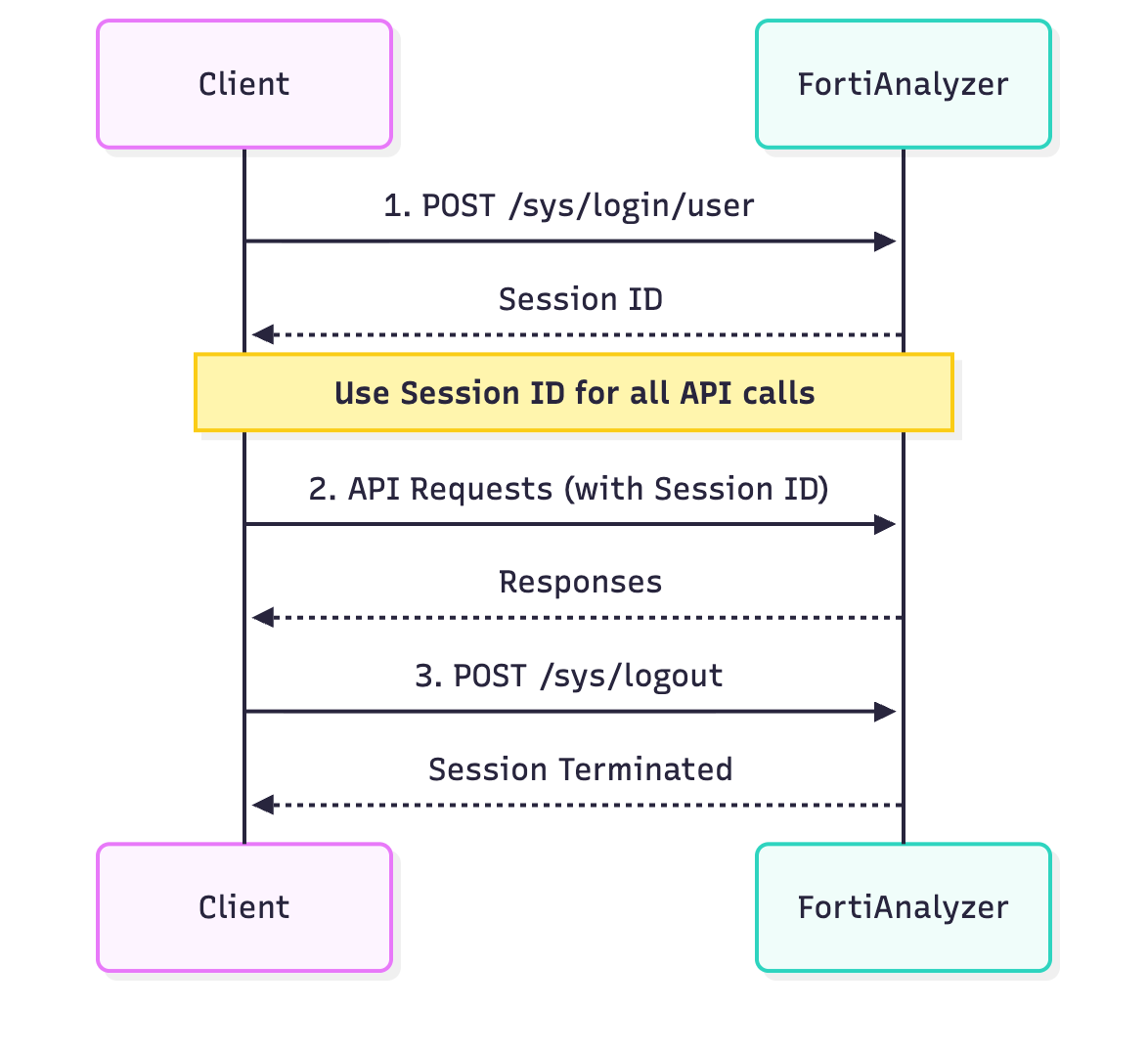
Session Authentication Flow:
Login: Client sends credentials → FortiAnalyzer returns Session ID
API Calls: Client uses Session ID in all subsequent requests
Logout: Client terminates session when done
Step 1: Login#
Endpoint: /sys/login/user
Method: exec
Parameters#
Parameter |
Type |
Required |
Description |
|---|---|---|---|
|
|
Yes |
Username |
|
|
Yes |
Password |
{
    "method": "exec",
    "params": [{
        "url": "/sys/login/user",
        "data": {
            "user": "admin",
            "passwd": "your_password"
        }
    }],
    "session": null,
    "id": 1
}
{
    "result": [{
        "status": {
            "code": 0,
            "message": "OK"
        },
        "url": "/sys/login/user"
    }],
    "session": "kLSFZ7qT9xZc1vB3rtKlXg==",
    "id": 1
}
📝 Note: Save the
sessionvalue from the response - you’ll use it for all subsequent API calls.
Step 2: Use Session ID#
Include the session ID in all subsequent requests:
{
    "method": "get",
    "params": [{
        "url": "/api/endpoint"
    }],
    "session": "kLSFZ7qT9xZc1vB3rtKlXg==",
    "id": 2
}
Step 3: Logout#
Endpoint: /sys/logout
Method: exec
{
    "method": "exec",
    "params": [{
        "url": "/sys/logout"
    }],
    "session": "kLSFZ7qT9xZc1vB3rtKlXg==",
    "id": 999
}
{
    "result": [{
        "status": {
            "code": 0,
            "message": "OK"
        },
        "url": "/sys/logout"
    }],
    "id": 999
}
⚠️ Warning: Always logout to free server resources. Use try/finally blocks to ensure logout occurs even if errors happen.
Python Implementation#
import json
import requests
import urllib3

# Disable SSL warnings for self-signed certificates
urllib3.disable_warnings(urllib3.exceptions.InsecureRequestWarning)

class FortiAnalyzerSession:
    """Context manager for FortiAnalyzer session management"""

    def __init__(self, host, port, username, password):
        self.host = host
        self.port = port
        self.username = username
        self.password = password
        self.session_id = None
        self.base_url = f"https://{host}:{port}/jsonrpc"

    def __enter__(self):
        """Login and return session ID"""
        payload = {
            "method": "exec",
            "params": [{
                "url": "/sys/login/user",
                "data": {
                    "user": self.username,
                    "passwd": self.password
                }
            }],
            "session": None,
            "id": 1
        }

        try:
            response = requests.post(
                self.base_url,
                json=payload,
                verify=False,
                timeout=10
            )
            response.raise_for_status()
            result = response.json()

            if result['result'][0]['status']['code'] == 0:
                self.session_id = result.get('session')
                print(f"✓ Logged in successfully. Session: {self.session_id}")
                return self.session_id
            else:
                raise Exception(f"Login failed: {result['result'][0]['status']['message']}")

        except requests.exceptions.RequestException as e:
            raise Exception(f"Connection error: {str(e)}")

    def __exit__(self, exc_type, exc_val, exc_tb):
        """Logout and terminate session"""
        if self.session_id:
            payload = {
                "method": "exec",
                "params": [{"url": "/sys/logout"}],
                "session": self.session_id,
                "id": 999
            }

            try:
                requests.post(self.base_url, json=payload, verify=False, timeout=10)
                print("✓ Logged out successfully")
            except:
                pass  # Best effort logout

# Usage Example
def main():
    config = {
        'faz_host': 'faz.example.com',
        'faz_port': '443',
        'username': 'admin',
        'password': 'your_password_here'
    }

    # Use context manager for automatic session management
    with FortiAnalyzerSession(
        host=config['faz_host'],
        port=config['faz_port'],
        username=config['username'],
        password=config['password']
    ) as session_id:
        # Your API calls here
        print(f"Making API calls with session: {session_id}")

        # Example API call
        url = f"https://{config['faz_host']}:{config['faz_port']}/jsonrpc"
        payload = {
            "method": "get",
            "params": [{"url": "/sys/status"}],
            "session": session_id,
            "id": 2
        }

        response = requests.post(url, json=payload, verify=False)
        print(json.dumps(response.json(), indent=2))

    # Session automatically logged out when exiting context

if __name__ == "__main__":
    main()
cURL Example#
#!/bin/bash

# Configuration
FAZ_HOST="faz.example.com"
FAZ_PORT="443"
USERNAME="admin"
PASSWORD="your_password_here"

# Step 1: Login
echo "=== Logging in ==="
LOGIN_RESPONSE=$(curl -k -s -X POST "https://${FAZ_HOST}:${FAZ_PORT}/jsonrpc" \
  -H "Content-Type: application/json" \
  -d '{
    "method": "exec",
    "params": [{
      "url": "/sys/login/user",
      "data": {
        "user": "'${USERNAME}'",
        "passwd": "'${PASSWORD}'"
      }
    }],
    "session": null,
    "id": 1
  }')

# Extract session ID
SESSION_ID=$(echo $LOGIN_RESPONSE | jq -r '.session')

if [ "$SESSION_ID" == "null" ] || [ -z "$SESSION_ID" ]; then
  echo "✗ Login failed"
  echo "$LOGIN_RESPONSE" | jq '.'
  exit 1
fi

echo "✓ Logged in. Session ID: $SESSION_ID"

# Step 2: Make API calls
echo -e "\n=== Making API call ==="
curl -k -s -X POST "https://${FAZ_HOST}:${FAZ_PORT}/jsonrpc" \
  -H "Content-Type: application/json" \
  -d '{
    "method": "get",
    "params": [{"url": "/sys/status"}],
    "session": "'${SESSION_ID}'",
    "id": 2
  }' | jq '.'

# Step 3: Logout
echo -e "\n=== Logging out ==="
curl -k -s -X POST "https://${FAZ_HOST}:${FAZ_PORT}/jsonrpc" \
  -H "Content-Type: application/json" \
  -d '{
    "method": "exec",
    "params": [{"url": "/sys/logout"}],
    "session": "'${SESSION_ID}'",
    "id": 999
  }' > /dev/null

echo "✓ Logged out"
Method 2: API Key Authentication#
Overview#
API key authentication uses Bearer tokens in the Authorization header, eliminating the need for session management.
💡 Tip: API keys are ideal for:
Automated scripts and cron jobs
CI/CD pipelines
Long-running services
Stateless applications
Creating an API Key#
Log into FortiAnalyzer web interface
Navigate to System Settings > Admin > Administrators
Select your admin user
Click Create New in the API Key section
Copy and securely store the generated key
⚠️ Warning: API keys provide full access. Store them securely and rotate regularly.
Using API Keys#
Include the API key in the Authorization header:
POST /jsonrpc HTTP/1.1
Host: faz.example.com:443
Content-Type: application/json
Authorization: Bearer YOUR_API_KEY_HERE

{
    "method": "get",
    "params": [{
        "url": "/sys/status"
    }],
    "session": null,
    "id": 1
}
📝 Note: When using API keys, set
"session": nullin requests.
Python Implementation#
import json
import requests
import urllib3

# Disable SSL warnings
urllib3.disable_warnings(urllib3.exceptions.InsecureRequestWarning)

def load_config():
    """Load configuration from .faz-env.json"""
    with open('.faz-env.json', 'r') as f:
        return json.load(f)

def api_call_with_key(config, method, url_path, data=None):
    """
    Make API call using API key authentication

    Args:
        config: Configuration dictionary with API key
        method: API method (get, add, set, update, delete, exec)
        url_path: API endpoint path
        data: Optional data payload

    Returns:
        dict: API response
    """
    url = f"https://{config['faz_host']}:{config['faz_port']}/jsonrpc"

    headers = {
        "Content-Type": "application/json",
        "Authorization": f"Bearer {config['api_key']}"
    }

    params = [{
        "url": url_path
    }]

    if data:
        params[0]["data"] = data

    payload = {
        "method": method,
        "params": params,
        "session": None,  # Not needed with API key
        "id": 1
    }

    try:
        response = requests.post(
            url,
            json=payload,
            headers=headers,
            verify=False,
            timeout=30
        )
        response.raise_for_status()
        result = response.json()

        if result['result'][0]['status']['code'] == 0:
            return result['result'][0].get('data', {})
        else:
            raise Exception(f"API error: {result['result'][0]['status']['message']}")

    except requests.exceptions.RequestException as e:
        raise Exception(f"Request error: {str(e)}")

def main():
    """Example using API key authentication"""
    config = load_config()

    try:
        # No login required - just make API calls
        print("Making API call with API key...")

        result = api_call_with_key(
            config=config,
            method="get",
            url_path="/sys/status"
        )

        print("✓ API call successful")
        print(json.dumps(result, indent=2))

        # No logout needed

    except Exception as e:
        print(f"✗ Error: {str(e)}")

if __name__ == "__main__":
    main()
cURL Example#
#!/bin/bash

# Configuration
FAZ_HOST="faz.example.com"
FAZ_PORT="443"
API_KEY="your_api_key_here"

# Make API call (no login/logout needed)
echo "=== Making API call with API key ==="
curl -k -s -X POST "https://${FAZ_HOST}:${FAZ_PORT}/jsonrpc" \
  -H "Content-Type: application/json" \
  -H "Authorization: Bearer ${API_KEY}" \
  -d '{
    "method": "get",
    "params": [{
      "url": "/sys/status"
    }],
    "session": null,
    "id": 1
  }' | jq '.'

echo "✓ Complete (no logout needed)"
Configuration File (.faz-env.json)#
Store your credentials securely in a configuration file:
{
    "faz_host": "faz.example.com",
    "faz_port": "443",
    "auth_method": "apikey",
    "username": "admin",
    "password": "your_password_here",
    "api_key": "your_api_key_here",
    "adom": "root"
}
Loading Configuration#
import json

def load_config():
    """Load FortiAnalyzer configuration"""
    with open('.faz-env.json', 'r') as f:
        config = json.load(f)

    # Validate required fields
    required = ['faz_host', 'faz_port', 'auth_method']
    for field in required:
        if field not in config:
            raise ValueError(f"Missing required field: {field}")

    # Validate auth method
    if config['auth_method'] == 'session':
        if 'username' not in config or 'password' not in config:
            raise ValueError("Session auth requires username and password")
    elif config['auth_method'] == 'apikey':
        if 'api_key' not in config:
            raise ValueError("API key auth requires api_key")

    return config
⚠️ Security Warning:
Never commit
.faz-env.jsonto version controlAdd to
.gitignoreUse environment variables in production
Rotate API keys regularly
Use least-privilege access
Error Handling#
Common Authentication Errors#
Error Code -11: Invalid Credentials#
{
    "result": [{
        "status": {
            "code": -11,
            "message": "Invalid user name or password"
        }
    }]
}
Solutions:
Verify username and password
Check account is not locked
Ensure user has API permissions
Error Code -10: Session Timeout#
{
    "result": [{
        "status": {
            "code": -10,
            "message": "Session timeout"
        }
    }]
}
Solutions:
Re-authenticate to get new session
Implement session refresh logic
Consider using API key instead
Error: Invalid API Key#
{
    "result": [{
        "status": {
            "code": 401,
            "message": "Unauthorized"
        }
    }]
}
Solutions:
Verify API key is correct
Check API key hasn’t expired
Ensure proper Authorization header format
Best Practices#
Session-Based Authentication#
💡 Tip: Session Management
Always use try/finally to ensure logout
Implement session timeout handling
Reuse sessions for multiple API calls
Monitor session expiration time
💡 Tip: Connection Pooling
Use
requests.Session()for connection poolingReduces overhead of establishing connections
Improves performance for multiple calls
API Key Authentication#
💡 Tip: Security
Store API keys in environment variables
Never hardcode keys in source code
Use different keys for different environments
Implement key rotation policy
💡 Tip: Performance
API keys eliminate login/logout overhead
Better for high-frequency API calls
Suitable for stateless architectures
General#
⚠️ Warning: SSL Certificate Verification
Production: Enable certificate verification (
verify=True)Development: Use
verify=Falseonly for testingInstall proper SSL certificates in production
💡 Tip: Rate Limiting
Implement exponential backoff for retries
Monitor API call frequency
Respect FortiAnalyzer resource limits
Comparison: Session vs API Key#
Feature |
Session-Based |
API Key |
|---|---|---|
Setup |
Login required |
No login needed |
State |
Stateful (session ID) |
Stateless |
Logout |
Required |
Not needed |
Overhead |
Higher (login/logout) |
Lower |
Use Case |
Interactive apps |
Automation, scripts |
Security |
Session timeout |
Key rotation |
Complexity |
More complex |
Simpler |
Recommendation:
Use Sessions: Interactive applications, web interfaces
Use API Keys: Scripts, automation, CI/CD, long-running services
Complete Examples#
Example 1: Session-Based Script#
#!/usr/bin/env python3
"""Example script using session-based authentication"""

import json
import sys
from fortianalyzer_session import FortiAnalyzerSession

def main():
    # Load config
    with open('.faz-env.json') as f:
        config = json.load(f)

    # Use context manager for session
    try:
        with FortiAnalyzerSession(
            host=config['faz_host'],
            port=config['faz_port'],
            username=config['username'],
            password=config['password']
        ) as session_id:

            print("Session established - making API calls...")

            # Your API operations here
            # session_id is available for all calls

    except Exception as e:
        print(f"Error: {e}", file=sys.stderr)
        sys.exit(1)

    print("Complete - session automatically closed")

if __name__ == '__main__':
    main()
Example 2: API Key Script#
#!/usr/bin/env python3
"""Example script using API key authentication"""

import json
import sys
from fortianalyzer_client import FortiAnalyzerClient

def main():
    # Load config
    with open('.faz-env.json') as f:
        config = json.load(f)

    # Create client with API key
    client = FortiAnalyzerClient(
        host=config['faz_host'],
        port=config['faz_port'],
        api_key=config['api_key']
    )

    try:
        # Make API calls - no session management needed
        result = client.get('/sys/status')
        print(json.dumps(result, indent=2))

    except Exception as e:
        print(f"Error: {e}", file=sys.stderr)
        sys.exit(1)

    # No cleanup needed

if __name__ == '__main__':
    main()
Next Steps#
Now that you understand authentication, you can: