
LogView Search#
Search and retrieve logs from FortiAnalyzer using flexible filters and time ranges.
✅ All code examples tested: Verified against FortiAnalyzer v7.4.8, v7.6.4, v8.0.0.
Overview#
The LogView Search endpoint allows you to query logs stored in FortiAnalyzer with powerful filtering capabilities. This is one of the most frequently used API endpoints for:
Security incident investigation
Compliance auditing and reporting
Network troubleshooting
Traffic analysis
Threat hunting
This endpoint uses a two-step asynchronous pattern because log searches can process millions of records and may take several seconds to complete.
💡 Tip: This two-step pattern is essential for handling large log datasets efficiently. The FortiAnalyzer processes your query in the background while your application polls for completion.
Workflow Diagram#
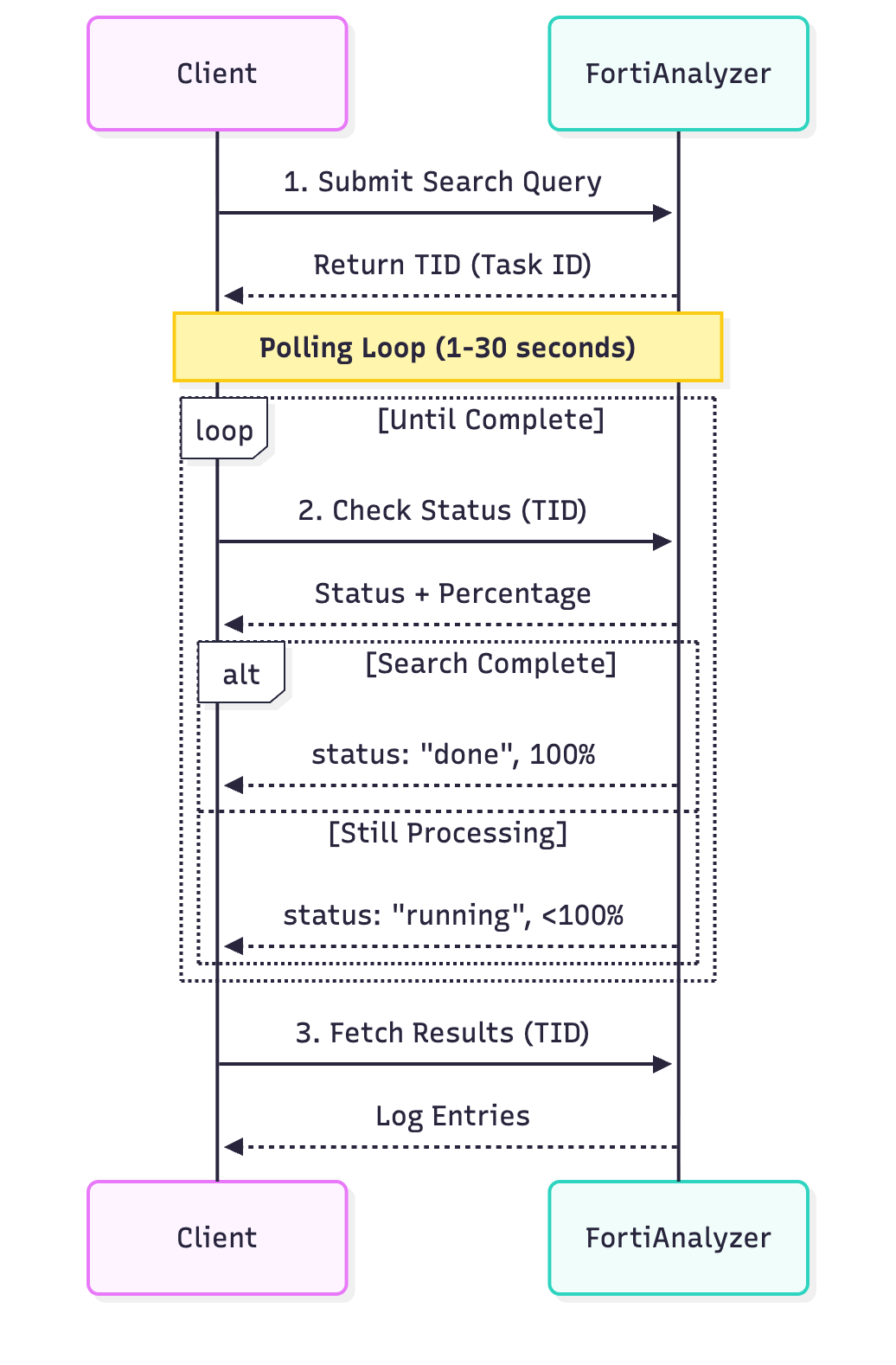
Two-Step Asynchronous Pattern:
Submit Query: Client sends search request → FortiAnalyzer returns TID (Task ID)
Poll Status: Client polls status endpoint with TID every 1-2 seconds
FortiAnalyzer returns progress percentage and status
Continue until
status: "done"andpercentage: 100
Fetch Results: Client retrieves log entries using TID
Endpoint Details#
Method: POST
URL: /jsonrpc
ADOM Support: Yes (required)
Requires Authentication: Yes
Minimum Version: 7.0.0
Step 1 Endpoint#
API Path:
/logview/adom/{adom}/logsearchMethod:
addReturns: Task ID (TID)
Step 2 Endpoint#
API Path:
/logview/adom/{adom}/logsearch/{tid}Method:
getReturns: Search results and status
Prerequisites#
Active session or valid API key
Read access to the specified ADOM
Log data available for the time range
Appropriate log retention settings
Step 1: Submit Search Query#
Parameters#
Parameter |
Type |
Required |
Default |
Description |
|---|---|---|---|---|
|
|
Yes |
- |
ADOM name (e.g., “root”) |
|
|
Yes |
- |
Device name, group, or array of devices |
|
|
Yes |
- |
Log type (traffic, event, app-ctrl, etc.) |
|
|
No |
- |
Log filter expression |
|
|
Yes |
- |
Time range specification |
|
|
No |
|
Case-sensitive filtering |
|
|
No |
|
Maximum number of logs to return |
Log Types#
Log Type |
Description |
|---|---|
|
Firewall traffic logs |
|
System and security events |
|
Application control logs |
|
IPS/IDS attack logs |
|
AntiVirus logs |
|
Web filtering logs |
|
DNS query logs |
|
SSH logs |
|
SSL/TLS logs |
Time Range Format#
Absolute Time:
{
    "start": "2024-11-09 00:00:00",
    "end": "2024-11-09 23:59:59"
}
Relative Time:
{
    "last-n-hours": 24
}
Epoch Time:
{
    "start": 1699488000,
    "end": 1699574399
}
Filter Syntax#
FortiAnalyzer uses a SQL-like filter syntax:
Basic Operators:
==Equal to!=Not equal to>Greater than<Less than>=Greater than or equal<=Less than or equal
Logical Operators:
andLogical ANDorLogical ORnotLogical NOT
Examples:
srcip==10.0.1.100
srcip==10.0.1.0/24 and dstport==443
srcip!=192.168.1.0/24 or dstip!=10.0.0.0/8
action==deny and (dstport==22 or dstport==3389)
hostname contains "server" and severity>=high
Request Example#
{
    "method": "add",
    "params": [{
        "url": "/logview/adom/root/logsearch",
        "data": {
            "device": "All_FortiGate",
            "logtype": "traffic",
            "filter": "srcip==10.0.1.100 and dstport==443",
            "time-range": {
                "last-n-hours": 24
            },
            "case-sensitive": false,
            "max-logs": 5000
        }
    }],
    "session": "{{session_id}}",
    "id": 1
}
{
    "result": [{
        "data": {
            "tid": 12345
        },
        "status": {
            "code": 0,
            "message": "OK"
        },
        "url": "/logview/adom/root/logsearch"
    }],
    "session": "kLSFZ7qT9xZc1vB3rtKlXg==",
    "id": 1
}
📝 Note: Save the
tidvalue! You’ll need it to check status and retrieve results.
Step 2: Poll Status and Fetch Results#
Polling Strategy#
💡 Tip: Use exponential backoff to balance responsiveness with server load.
Recommended Pattern:
Wait 1 second, check status
If not complete, wait 2 seconds
If still not complete, wait 4 seconds
Continue doubling up to 10 seconds maximum
Implement timeout (default: 30 seconds)
Parameters#
Parameter |
Type |
Required |
Default |
Description |
|---|---|---|---|---|
|
|
Yes |
- |
Same ADOM as Step 1 |
|
|
Yes |
- |
Task ID from Step 1 |
|
|
No |
|
Results per page |
|
|
No |
|
Starting position |
Request Example#
{
    "method": "get",
    "params": [{
        "url": "/logview/adom/root/logsearch/12345",
        "data": {
            "limit": 100,
            "offset": 0
        }
    }],
    "session": "{{session_id}}",
    "id": 2
}
Response Format#
While Processing#
{
    "result": [{
        "data": {
            "tid": 12345,
            "status": "running",
            "percentage": 45,
            "total_lines": 0,
            "message": "Searching logs..."
        },
        "status": {
            "code": 0,
            "message": "OK"
        }
    }],
    "id": 2
}
When Complete#
{
    "result": [{
        "data": {
            "tid": 12345,
            "status": "done",
            "percentage": 100,
            "total_lines": 450,
            "logs": [
                {
                    "date": "2024-11-09",
                    "time": "14:23:15",
                    "devid": "FGT-01",
                    "devname": "FortiGate-01",
                    "logid": "0000000013",
                    "type": "traffic",
                    "subtype": "forward",
                    "level": "notice",
                    "srcip": "10.0.1.100",
                    "srcport": 54321,
                    "dstip": "172.217.14.206",
                    "dstport": 443,
                    "proto": 6,
                    "action": "accept",
                    "policyid": 5,
                    "service": "HTTPS",
                    "sentbyte": 2048,
                    "rcvdbyte": 8192,
                    "duration": 120
                }
                // ... more log entries
            ]
        },
        "status": {
            "code": 0,
            "message": "OK"
        }
    }],
    "id": 2
}
Response Fields#
Field |
Type |
Description |
|---|---|---|
|
|
Task ID |
|
|
“running”, “done”, “cancelled”, or “error” |
|
|
Completion percentage (0-100) |
|
|
Total log entries found (when complete) |
|
|
Array of log entries (when complete) |
Complete Implementation#
Python Example with Full Workflow#
import json
import requests
import urllib3
import time
from typing import List, Dict

# Disable SSL warnings
urllib3.disable_warnings(urllib3.exceptions.InsecureRequestWarning)

def load_config():
    """Load FortiAnalyzer configuration"""
    with open('.faz-env.json', 'r') as f:
        return json.load(f)

def login(config):
    """Establish session"""
    url = f"https://faz.example.com/jsonrpc"

    payload = {
        "method": "exec",
        "params": [{
            "url": "/sys/login/user",
            "data": {
                "user": config['username'],
                "passwd": config['password']
            }
        }],
        "session": None,
        "id": 1
    }

    response = requests.post(url, json=payload, verify=False, timeout=10)
    response.raise_for_status()
    result = response.json()

    if result['result'][0]['status']['code'] == 0:
        return result.get('session')
    else:
        raise Exception(f"Login failed: {result['result'][0]['status']['message']}")

def logout(config, session_id):
    """Terminate session"""
    url = f"https://faz.example.com/jsonrpc"
    payload = {
        "method": "exec",
        "params": [{"url": "/sys/logout"}],
        "session": session_id,
        "id": 999
    }
    requests.post(url, json=payload, verify=False)

def submit_log_search(session_id, config, adom, device, logtype, filter_expr, time_range):
    """
    Step 1: Submit log search and get TID

    Args:
        session_id: Active session ID
        config: Configuration dictionary
        adom: ADOM name
        device: Device name or group
        logtype: Log type (traffic, event, etc.)
        filter_expr: Filter expression
        time_range: Time range dict

    Returns:
        int: Task ID (TID)
    """
    url = f"https://faz.example.com/jsonrpc"

    payload = {
        "method": "add",
        "params": [{
            "url": f"/logview/adom/{adom}/logsearch",
            "data": {
                "device": device,
                "logtype": logtype,
                "filter": filter_expr,
                "time-range": time_range,
                "case-sensitive": False,
                "max-logs": 5000
            }
        }],
        "session": session_id,
        "id": 2
    }

    response = requests.post(url, json=payload, verify=False, timeout=30)
    response.raise_for_status()
    result = response.json()

    if result['result'][0]['status']['code'] == 0:
        tid = result['result'][0]['data']['tid']
        print(f"✓ Search submitted successfully. TID: {tid}")
        return tid
    else:
        raise Exception(f"Search failed: {result['result'][0]['status']['message']}")

def check_search_status(session_id, config, adom, tid):
    """
    Check search status

    Args:
        session_id: Active session ID
        config: Configuration dictionary
        adom: ADOM name
        tid: Task ID

    Returns:
        dict: Status information
    """
    url = f"https://faz.example.com/jsonrpc"

    payload = {
        "method": "get",
        "params": [{
            "url": f"/logview/adom/{adom}/logsearch/{tid}"
        }],
        "session": session_id,
        "id": 3
    }

    response = requests.post(url, json=payload, verify=False, timeout=30)
    response.raise_for_status()
    result = response.json()

    if result['result'][0]['status']['code'] == 0:
        return result['result'][0]['data']
    else:
        raise Exception(f"Status check failed: {result['result'][0]['status']['message']}")

def fetch_search_results(session_id, config, adom, tid, limit=100, offset=0):
    """
    Step 2: Fetch search results

    Args:
        session_id: Active session ID
        config: Configuration dictionary
        adom: ADOM name
        tid: Task ID
        limit: Results per page
        offset: Starting position

    Returns:
        dict: Search results
    """
    url = f"https://faz.example.com/jsonrpc"

    payload = {
        "method": "get",
        "params": [{
            "url": f"/logview/adom/{adom}/logsearch/{tid}",
            "data": {
                "limit": limit,
                "offset": offset
            }
        }],
        "session": session_id,
        "id": 4
    }

    response = requests.post(url, json=payload, verify=False, timeout=30)
    response.raise_for_status()
    result = response.json()

    if result['result'][0]['status']['code'] == 0:
        return result['result'][0]['data']
    else:
        raise Exception(f"Fetch failed: {result['result'][0]['status']['message']}")

def wait_for_search_completion(session_id, config, adom, tid, timeout=30):
    """
    Poll search until complete with exponential backoff

    Args:
        session_id: Active session ID
        config: Configuration dictionary
        adom: ADOM name
        tid: Task ID
        timeout: Maximum wait time in seconds

    Returns:
        dict: Final status data
    """
    start_time = time.time()
    delay = 1
    max_delay = 10

    while True:
        # Check timeout
        elapsed = time.time() - start_time
        if elapsed > timeout:
            raise TimeoutError(f"Search did not complete within {timeout} seconds")

        # Check status
        status_data = check_search_status(session_id, config, adom, tid)

        status = status_data.get('status', 'unknown')
        percentage = status_data.get('percentage', 0)

        print(f"  Status: {status} - {percentage}% complete")

        # Check completion
        if status == 'done' and percentage == 100:
            print("✓ Search completed successfully")
            return status_data
        elif status == 'error':
            raise Exception(f"Search failed: {status_data.get('message', 'Unknown error')}")
        elif status == 'cancelled':
            raise Exception("Search was cancelled")

        # Wait before next poll
        time.sleep(min(delay, max_delay))
        delay *= 2

def fetch_all_logs(session_id, config, adom, tid) -> List[Dict]:
    """
    Fetch all logs with pagination

    Args:
        session_id: Active session ID
        config: Configuration dictionary
        adom: ADOM name
        tid: Task ID

    Returns:
        list: All log entries
    """
    all_logs = []
    offset = 0
    limit = 100

    while True:
        data = fetch_search_results(session_id, config, adom, tid, limit, offset)

        logs = data.get('logs', [])
        if not logs:
            break

        all_logs.extend(logs)

        total_lines = data.get('total_lines', 0)
        print(f"  Fetched {len(all_logs)} of {total_lines} logs")

        if len(all_logs) >= total_lines:
            break

        offset += limit

    return all_logs

def main():
    """Main execution demonstrating log search workflow"""
    config = load_config()
    session_id = None

    try:
        # Login
        print("Step 1: Logging in...")
        session_id = login(config)
        print("✓ Logged in successfully\n")

        # Submit search
        print("Step 2: Submitting log search...")
        tid = submit_log_search(
            session_id=session_id,
            config=config,
            adom=config['adom'],
            device=config['device_filter'],
            logtype='traffic',
            filter_expr='srcip==10.0.1.100 and dstport==443',
            time_range={'last-n-hours': 24}
        )
        print()

        # Wait for completion
        print("Step 3: Waiting for search completion...")
        status_data = wait_for_search_completion(
            session_id=session_id,
            config=config,
            adom=config['adom'],
            tid=tid,
            timeout=config['search_timeout_seconds']
        )
        print()

        # Fetch all logs
        print("Step 4: Fetching logs...")
        all_logs = fetch_all_logs(
            session_id=session_id,
            config=config,
            adom=config['adom'],
            tid=tid
        )

        print(f"\n✓ Retrieved {len(all_logs)} total logs")

        # Display sample logs
        if all_logs:
            print("\nSample Log Entries:")
            for i, log in enumerate(all_logs[:3], 1):
                print(f"\nLog {i}:")
                print(f"  Time: {log.get('date')} {log.get('time')}")
                print(f"  Device: {log.get('devname')}")
                print(f"  Source: {log.get('srcip')}:{log.get('srcport')}")
                print(f"  Destination: {log.get('dstip')}:{log.get('dstport')}")
                print(f"  Action: {log.get('action')}")
                print(f"  Service: {log.get('service')}")

    except TimeoutError as e:
        print(f"\n✗ Timeout: {str(e)}")
    except Exception as e:
        print(f"\n✗ Error: {str(e)}")
    finally:
        if session_id:
            logout(config, session_id)
            print("\n✓ Logged out")

if __name__ == "__main__":
    main()
cURL Example#
#!/bin/bash

# Configuration
FAZ_HOST="faz.example.com"
FAZ_PORT="443"
USERNAME="admin"
PASSWORD="your_password_here"
ADOM="root"
TIMEOUT=30

# Login
echo "=== Step 1: Login ==="
LOGIN_RESPONSE=$(curl -k -s -X POST "https://${FAZ_HOST}:${FAZ_PORT}/jsonrpc" \
  -H "Content-Type: application/json" \
  -d '{
    "method": "exec",
    "params": [{
      "url": "/sys/login/user",
      "data": {"user": "'${USERNAME}'", "passwd": "'${PASSWORD}'"}
    }],
    "session": null,
    "id": 1
  }')

SESSION_ID=$(echo $LOGIN_RESPONSE | jq -r '.session')
echo "✓ Session ID: $SESSION_ID"
echo

# Submit search
echo "=== Step 2: Submit Search ==="
SEARCH_RESPONSE=$(curl -k -s -X POST "https://${FAZ_HOST}:${FAZ_PORT}/jsonrpc" \
  -H "Content-Type: application/json" \
  -d '{
    "method": "add",
    "params": [{
      "url": "/logview/adom/'${ADOM}'/logsearch",
      "data": {
        "device": "All_FortiGate",
        "logtype": "traffic",
        "filter": "srcip==10.0.1.100 and dstport==443",
        "time-range": {"last-n-hours": 24}
      }
    }],
    "session": "'${SESSION_ID}'",
    "id": 2
  }')

TID=$(echo $SEARCH_RESPONSE | jq -r '.result[0].data.tid')
echo "✓ Task ID: $TID"
echo

# Poll for completion
echo "=== Step 3: Waiting for Completion ==="
START_TIME=$(date +%s)
DELAY=1

while true; do
  CURRENT_TIME=$(date +%s)
  ELAPSED=$((CURRENT_TIME - START_TIME))

  if [ $ELAPSED -gt $TIMEOUT ]; then
    echo "✗ Timeout after ${TIMEOUT} seconds"
    break
  fi

  STATUS_RESPONSE=$(curl -k -s -X POST "https://${FAZ_HOST}:${FAZ_PORT}/jsonrpc" \
    -H "Content-Type: application/json" \
    -d '{
      "method": "get",
      "params": [{
        "url": "/logview/adom/'${ADOM}'/logsearch/'${TID}'"
      }],
      "session": "'${SESSION_ID}'",
      "id": 3
    }')

  STATUS=$(echo $STATUS_RESPONSE | jq -r '.result[0].data.status')
  PERCENTAGE=$(echo $STATUS_RESPONSE | jq -r '.result[0].data.percentage')

  echo "  Status: $STATUS - ${PERCENTAGE}% complete"

  if [ "$STATUS" = "done" ] && [ "$PERCENTAGE" = "100" ]; then
    echo "✓ Search completed"
    break
  fi

  sleep $DELAY
  DELAY=$((DELAY * 2))
  if [ $DELAY -gt 10 ]; then
    DELAY=10
  fi
done
echo

# Fetch results
echo "=== Step 4: Fetch Results ==="
RESULTS=$(curl -k -s -X POST "https://${FAZ_HOST}:${FAZ_PORT}/jsonrpc" \
  -H "Content-Type: application/json" \
  -d '{
    "method": "get",
    "params": [{
      "url": "/logview/adom/'${ADOM}'/logsearch/'${TID}'",
      "data": {"limit": 100, "offset": 0}
    }],
    "session": "'${SESSION_ID}'",
    "id": 4
  }')

TOTAL_LOGS=$(echo "$RESULTS" | jq -r '.result[0].data.total_lines')
echo "✓ Retrieved logs. Total: $TOTAL_LOGS"
echo
echo "Sample logs:"
echo "$RESULTS" | jq '.result[0].data.logs[0:3]'

# Logout
echo
echo "=== Step 5: Logout ==="
curl -k -s -X POST "https://${FAZ_HOST}:${FAZ_PORT}/jsonrpc" \
  -H "Content-Type: application/json" \
  -d '{
    "method": "exec",
    "params": [{"url": "/sys/logout"}],
    "session": "'${SESSION_ID}'",
    "id": 999
  }' > /dev/null

echo "✓ Logged out"
Error Handling#
Common Errors#
Error: Search Timeout#
Symptoms:
Percentage stuck below 100%
Elapsed time exceeds timeout
Solutions:
Increase timeout value
Narrow time range
Use more specific filters
Check FortiAnalyzer system load
Error Code -3: Invalid TID#
{
    "result": [{
        "status": {
            "code": -3,
            "message": "Invalid task ID"
        }
    }]
}
Causes:
TID expired (searches expire after ~30 minutes)
Incorrect TID value
Search was cancelled
Solutions:
Resubmit search
Verify TID from Step 1 response
Complete search within expiration window
Error: No Logs Found#
Symptoms:
total_lines: 0Empty
logsarray
Solutions:
Verify time range includes log data
Check filter syntax
Confirm device has logs for that period
Verify log type is correct
Best Practices#
💡 Tip: Filter Optimization
Use specific filters to reduce search time. Filter by srcip/dstip before other fields.
💡 Tip: Time Range Selection
Limit searches to necessary time periods. Searching 24 hours is much faster than 7 days.
💡 Tip: Pagination Strategy
For large result sets, fetch in batches of 100-1000 to avoid memory issues and timeouts.
⚠️ Warning: Concurrent Searches
FortiAnalyzer limits concurrent searches per user. Wait for completion before starting new searches.
Use Cases#
Use Case 1: Security Incident Investigation#
Investigate suspicious activity from a specific IP:
# Search for all denied traffic from suspicious IP
tid = submit_log_search(
    session_id=session,
    config=config,
    adom='root',
    device='All_FortiGate',
    logtype='traffic',
    filter_expr='srcip==192.168.1.100 and action==deny',
    time_range={'last-n-hours': 48}
)
Use Case 2: Compliance Reporting#
Collect all administrative access logs:
# Search admin login events
tid = submit_log_search(
    session_id=session,
    config=config,
    adom='root',
    device='All_FortiGate',
    logtype='event',
    filter_expr='logdesc contains "admin" and logdesc contains "login"',
    time_range={
        'start': '2024-11-01 00:00:00',
        'end': '2024-11-30 23:59:59'
    }
)
Use Case 3: Network Troubleshooting#
Find failed connections to a specific service:
# Search for connection failures to database server
tid = submit_log_search(
    session_id=session,
    config=config,
    adom='root',
    device='All_FortiGate',
    logtype='traffic',
    filter_expr='dstip==10.10.10.50 and dstport==3306 and action==deny',
    time_range={'last-n-hours': 4}
)
Troubleshooting#
See Common Errors section above for detailed troubleshooting.